
How to Check for a Warrant in Waller
Use the Waller Municipal Court portal or call the clerk because those routes address city citations. Its search options accept different identifiers; use only the field that matches your record, and contact staff if a result is unclear. Keep the citation number and date of birth available for a direct inquiry.
- Open the official Waller Municipal Court page and follow its current case-search link.
- Select the search field that matches your citation, name, driver license, or vehicle record.
- Call the court at 936-372-5614 if the result is missing or does not explain warrant status.
- Contact city police only for an enforcement question; use a county office for a separate county case.
- There is no public statewide warrant search; ask a lawyer about the city court’s resolution process.
Waller Municipal Portal Searches Six Ways
The court account lists searches by citation and date of birth; driver-license details and state; Social Security number and date of birth; plate and state with a second vehicle field; first and last name with date of birth; or business name. Not every mode applies to every ticket. Enter sensitive identifiers only on the verified city service and avoid sharing them in ordinary email.
The official Waller court page links the current search service and court instructions.
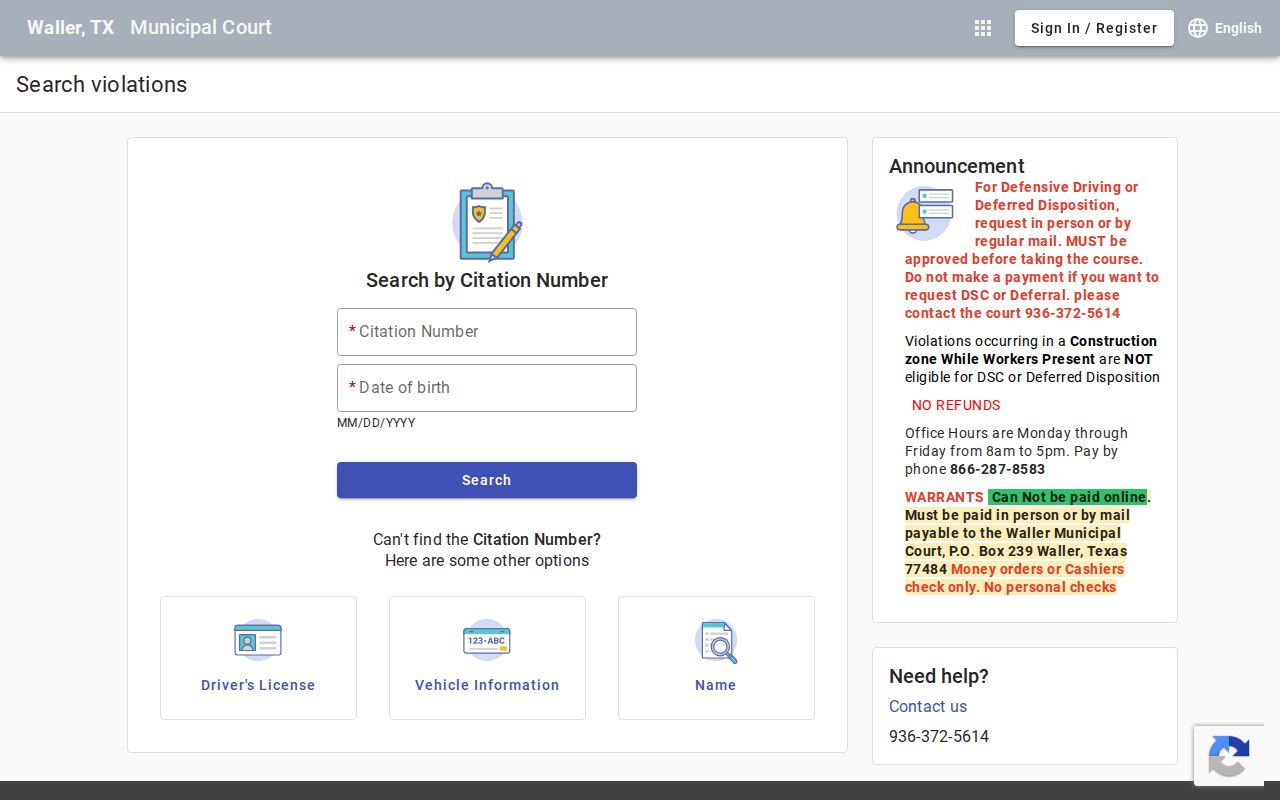
These are account search modes, not a searchable list of all city or county warrants.
The Waller Police Department and Municipal Court
Waller Municipal Court is at 1218 Farr Street, phone 936-372-5614. It handles city citations and its own docket. Waller Police Department is a separate law-enforcement agency; police may enforce process but cannot change a judge’s order or substitute for the court clerk’s status confirmation.
For a citation, ask the municipal clerk what is recorded and whether the court requires a personal appearance. The online case account does not replace the court’s direct instructions for resolving a warrant.
A Waller Court Phone Call Is Not an Appearance
The city lists a Wednesday 10 a.m. court session and warns that calling by phone does not count as appearing in court. Confirm the current docket date and whether a personal appearance is required. An after-hours drop box may accept certain items, but placing paperwork or a payment there does not itself show that the judge recalled a warrant.
Ask the clerk what proof to retain and when the court expects its file to reflect the action.
Types of Waller Warrants
Waller Municipal Court process can follow a city traffic or ordinance citation, or a missed appearance in a city case. A county JP ticket or criminal accusation belongs to another court. Because Waller is also the county name, check the exact court printed on the paper before choosing a portal or office.
| Warrant Type | How It Arises | Who Issues It |
|---|---|---|
| City traffic process | Unresolved city ticket or missed municipal-court setting. | Waller Municipal Court. |
| City ordinance case | Municipal citation for an alleged local violation. | Waller Municipal Court. |
| FTA or bench process | Failure to meet a court date or other city-court obligation. | The municipal judge handling the case. |
| Separate arrest warrant | Criminal complaint reviewed by a magistrate. | The issuing criminal court, not automatically the city court. |
Waller City Payment Rules Exclude Personal Checks
The city court says warrant payments cannot be made online. It accepts cashier’s checks or money orders by mail or in person and does not accept personal checks. The court lists P.O. Box 239 for mailed payments. Confirm the exact case, amount, payee, and mailing instruction before sending funds; a payment method does not itself guarantee recall.
Ask the clerk whether a separate appearance, motion, or judicial review is needed for the citation.
What a Waller Warrant Record Shows
The city search menu exposes several ways to locate an account, but it does not guarantee that every field displays a warrant, judge’s action, or current status. No standardized Waller city warrant number format is published. After locating a ticket, call the court to confirm the docket entry and next step.
| Case reference | Citation or cause number links the result to the city case; no warrant format is published. |
|---|---|
| Subject | The selected search field must match the person or account at issue. |
| Charge or offense | Use the ticket or ask the clerk to explain the docket description. |
| Issuing court | Confirm Waller Municipal Court, not a county JP venue. |
| Fine or bond | Ask the city clerk for the current amount and accepted method. |
| Status | Request direct confirmation; the search modes alone do not prove recall. |
Waller Search Fields Expose Different Identifiers
The portal’s person, driver-license, vehicle, and business searches identify accounts in different ways. A wrong or incomplete search can return no match even when the clerk has a record. The social-security-number option is especially sensitive; if you are uncertain that a page is official, stop and contact the court through its published phone number.
Request a clerk’s explanation rather than treating a portal result as an order or release notice.
Where Waller Warrants Fit With Waller County
The City of Waller Municipal Court is separate from Waller County’s JP, misdemeanor, and felony dockets; the sheriff and nonpublic TCIC/TLETS serve distinct county functions. Warrant flow: Waller Municipal Court › city enforcement as needed › county court or sheriff only when it holds the issuing record. For county sources and access limits, use the Waller County warrant-records overview or county search guide.
Waller Drop Box Does Not Set Court Status
The court describes an after-hours drop box, but submitting a document through it is not an order from the judge. Keep proof of delivery and contact the clerk to learn when the case record will be updated. If a warrant status is the concern, specifically ask whether the docket shows that it was recalled or whether another action remains.
This confirmation is separate from the portal’s account-search result.
Public Access to Waller Warrant Records
A city court lookup may show only part of a docket, and investigative or juvenile material may be confidential. A request to the City of Waller for public records is distinct from a motion filed in a court case. Ask the office that maintains the record which access rules apply and what can be released.
Key Rules:
Texas Public Information Act - Chapter 552 governs access to many city records, with exceptions and separate rules for judicial records.
Texas Code of Criminal Procedure Article 15.26 - this provision addresses delivery and execution of an arrest warrant by an authorized officer.
Texas Family Code Section 58.010 - juvenile records are subject to confidentiality restrictions.
Waller Court Must Confirm the Current Result
Use the portal to locate an account, then ask the clerk whether the judge has entered a recall or whether the case still requires action. If a result belongs to a different Waller County venue, the city court cannot resolve it. Keep the citation number and any written receipt available when you follow up.
Call before visiting to confirm the court session and appearance instructions.